Sprockett's Doggy Day Camp
For Theresa
v2.0 · May 2026
A walkthrough for the rollout

The Customer
Journey

How existing customers get onto the new platform — and how every new customer signs up from here on out.

Two tracks running in parallel

Existing customers (the ~3,800 we migrated from the previous system) get a guided three-touch activation. Anyone new who shows up signs up themselves through the website. Both tracks land in the same portal — same Phase 1 rules apply to both.

Existing customers · ~3,800

Three-touch activation

Customers we already have. They get a friendly heads-up first, an SMS reminder, then the actual activation invite. No action required from them until invite #3.

1Heads-up email — from the Sprockett's team
2SMS catch-up — ~24h later
3Activation invite — 4–5 days later
Lands in their portal
Phase 1: sign in, see dogs, sign waivers, view packages
New customers · forward-going

Self-serve signup

Anyone new lands on sprockettsddc.ca and clicks Join the Pack. They fill out the intake form, get a welcome email, and they're in the portal moments later.

1Visits sprockettsddc.ca
2Completes Join the Pack intake
3Welcome email — auto-fired
Lands in their portal
Same Phase 1 rules — routed to temperament test if booking daycare or boarding
The three-touch sequence

Each touch has a job. Touch 1 primes them so the activation email doesn't land cold. Touch 2 catches anyone who missed the email. Touch 3 is the one with the magic link.

Touch 1 · Email

Heads-up email

Day 0 · From the Sprockett's team

No action required. This is the warm-up so the activation email doesn't land cold.

Touch 2 · SMS

SMS catch-up

~24h after the email batch
Sprockett's · (204) 808-2272
Hi [First Name] — Sprockett's here. We're rolling out our new client portal this week: your dogs, bookings, vaccinations, and waivers all in one place. Watch for an invite email in the next few days. Reply HELP if you've got questions.

Catches anyone who didn't open the email. ~3,000 customers with valid mobile numbers receive this.

Touch 3 · Email

Activation invite

Day 4–5 · The actual login link

One-tap magic link. Customer sets a password, lands in their portal, sees their dogs.

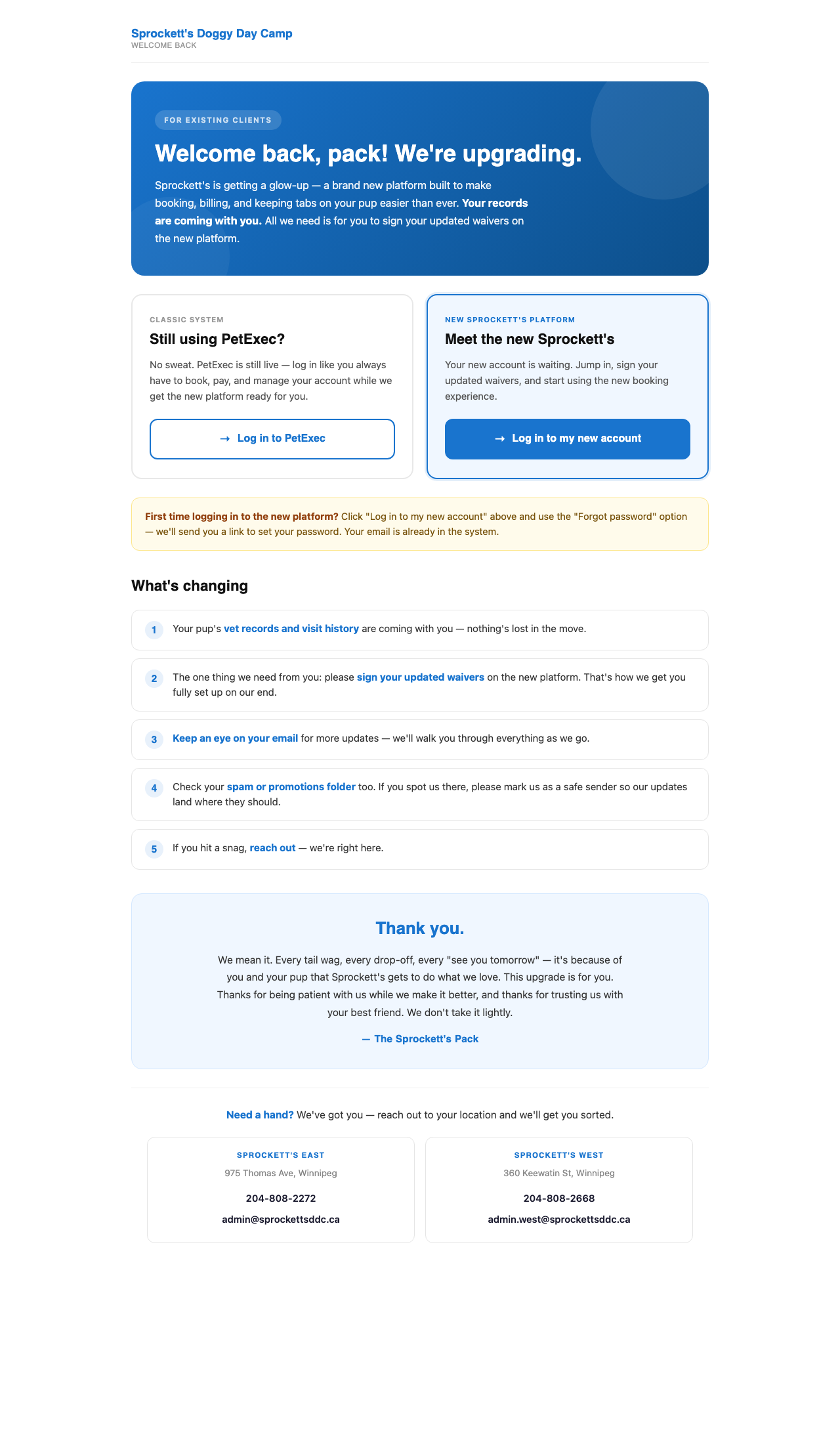
When they click "Existing Client"

During the cutover window, the Sprockett's homepage routes existing clients here instead of straight into PetExec. Two clear paths, warm context for the change, no confusion.

Two clear paths
Classic system (PetExec) for clients still using it during cutover · New platform for clients ready to log in.
First-time helper
Yellow tip explains the "Forgot password" path to set up the new account — their email is already in the system.
What's changing
Five-point list reassures clients: vet records and visit history come with them, only one ask (sign updated waivers), watch for email updates, check spam, reach out if stuck.
Help footer
Both East and West locations with phone + email if anyone hits a snag.

Their first time logging in

Whether they came in through the activation invite (existing) or finished Join the Pack (new), the first portal login is the same: tap the link from email, set a password, and they're in.

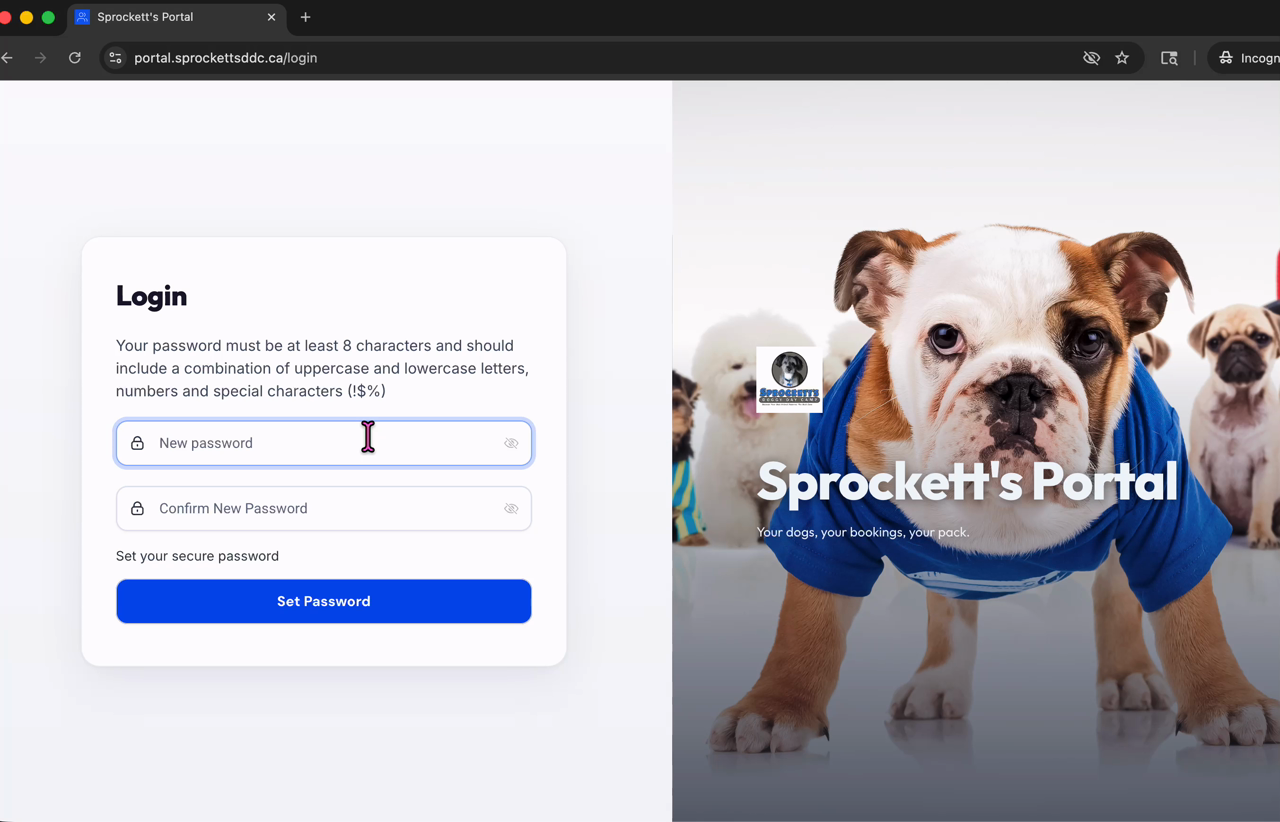
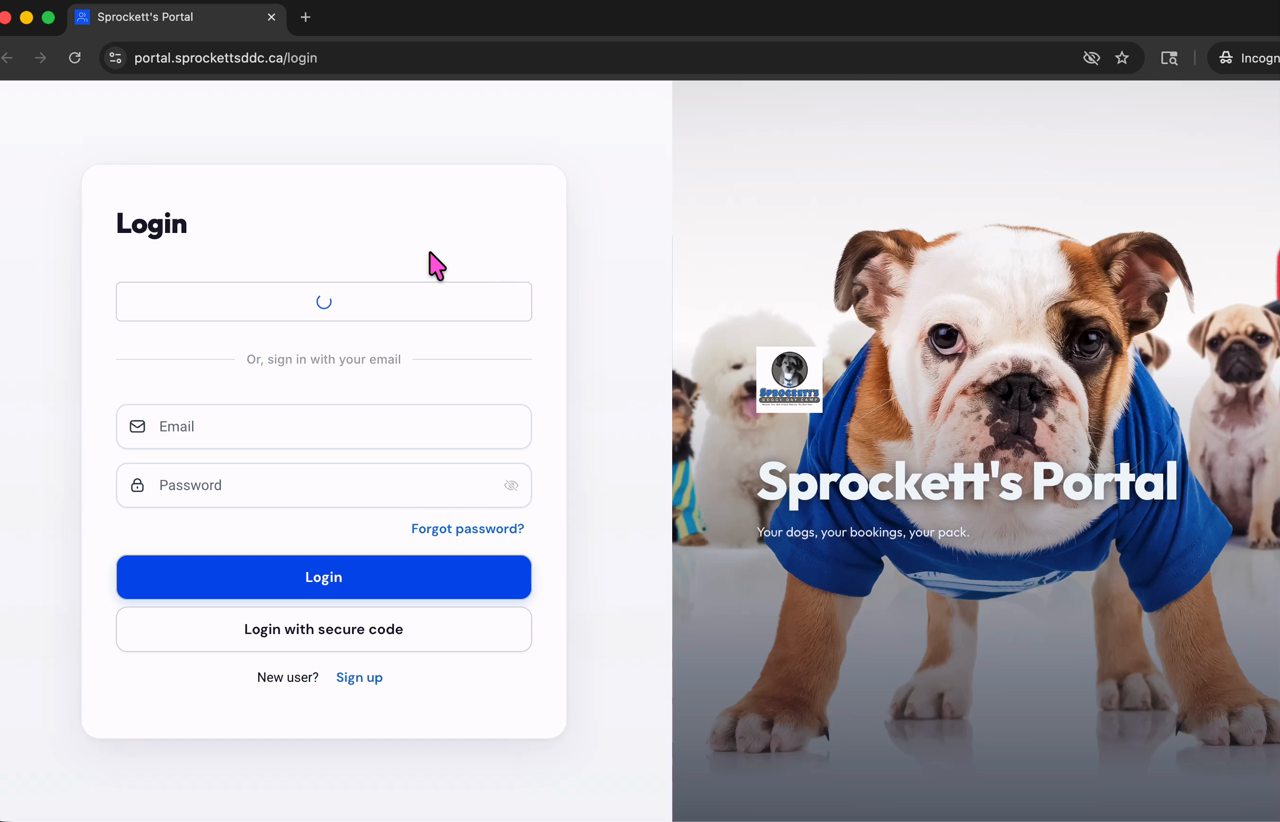
Sprockett's portal login screen
Step 1 · Tap the email link

Login screen, two ways in

Their email is already in the system. They can use the password they're about to set, or hit "Login with secure code" for a passwordless one-time link — great if they forget the password later.

Set password screen
Step 2 · Set their password

One-time setup, then they're in

Pick a password. That's it. They land in their portal home with all their dogs, their account, their bookings — everything in one place.

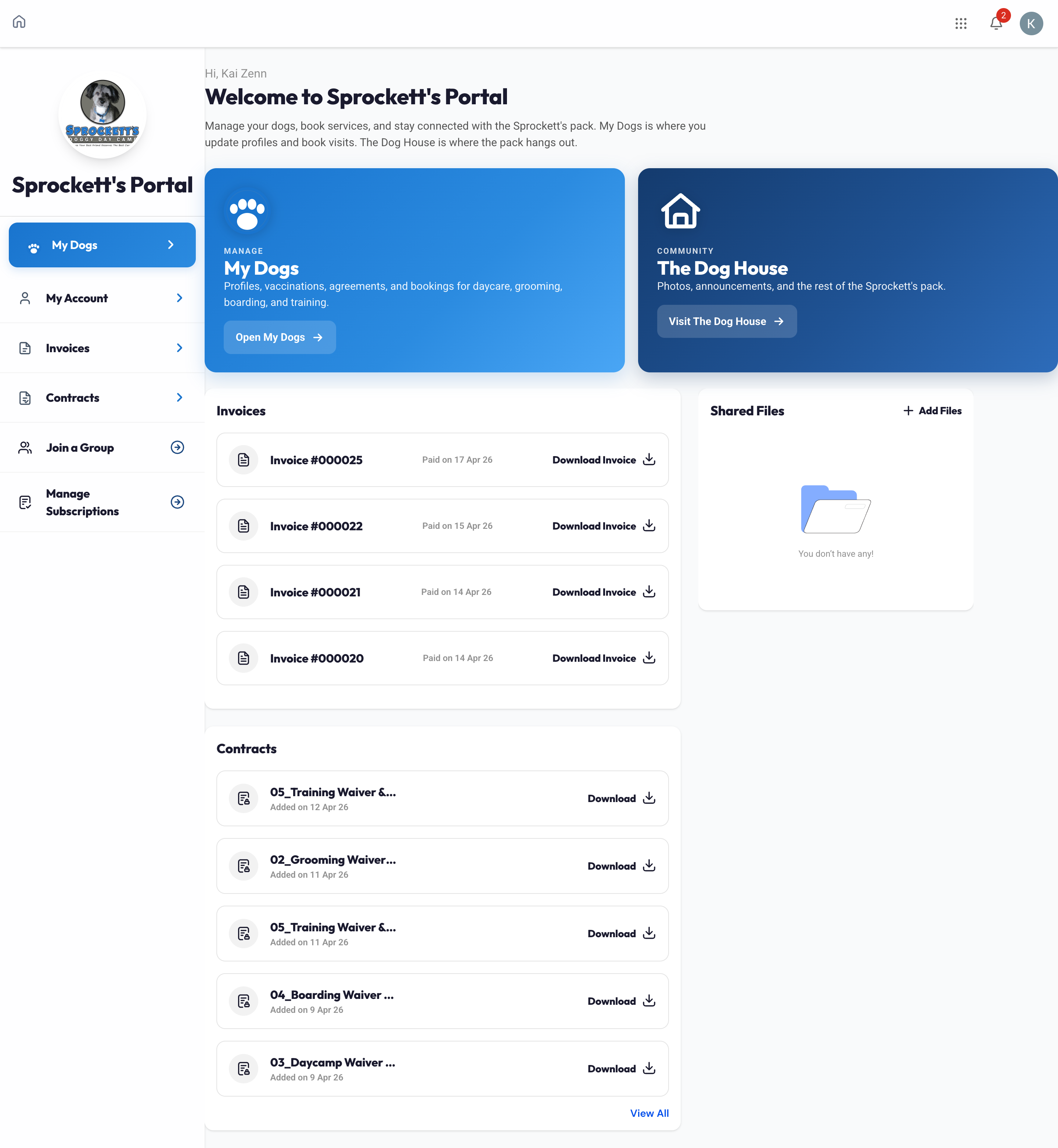
What they see at activation

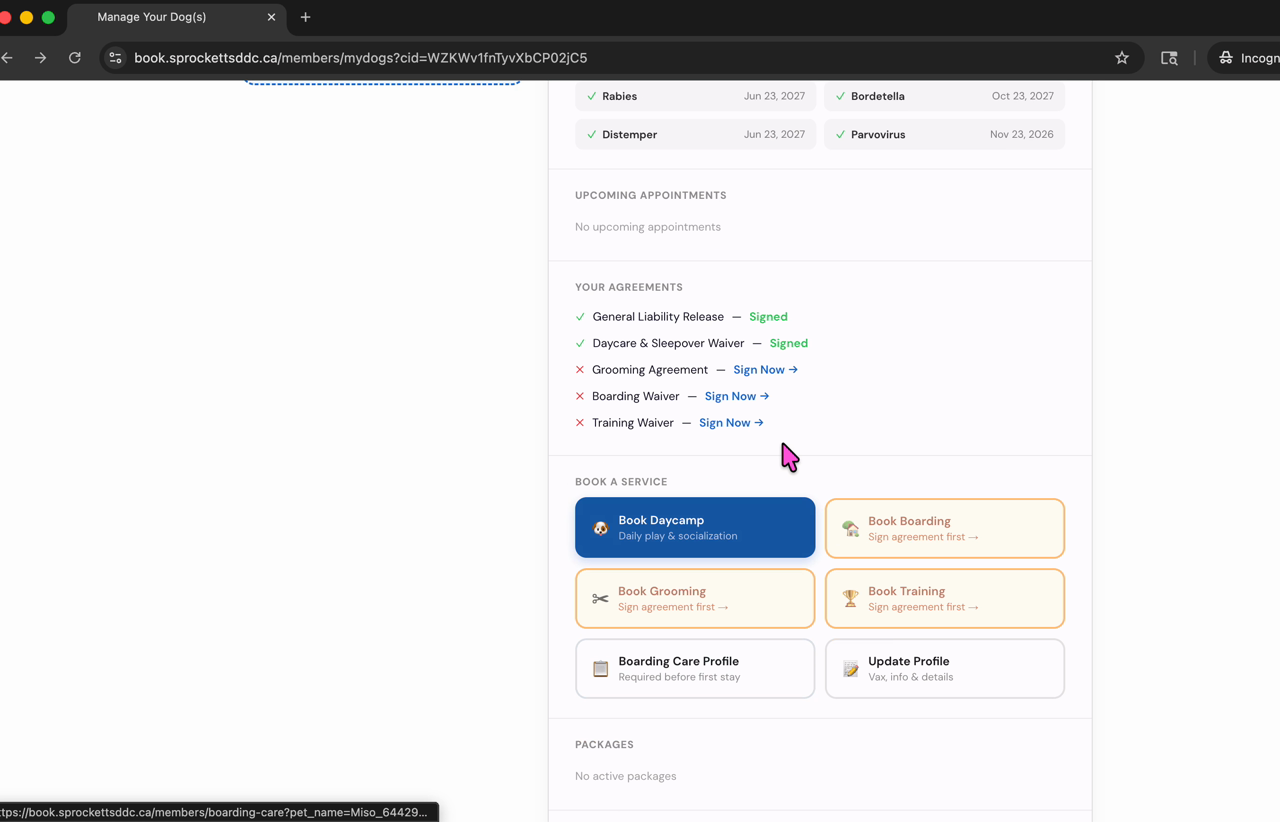
After they tap the magic link and set their password, this is the experience. Real screenshots from a customer test.

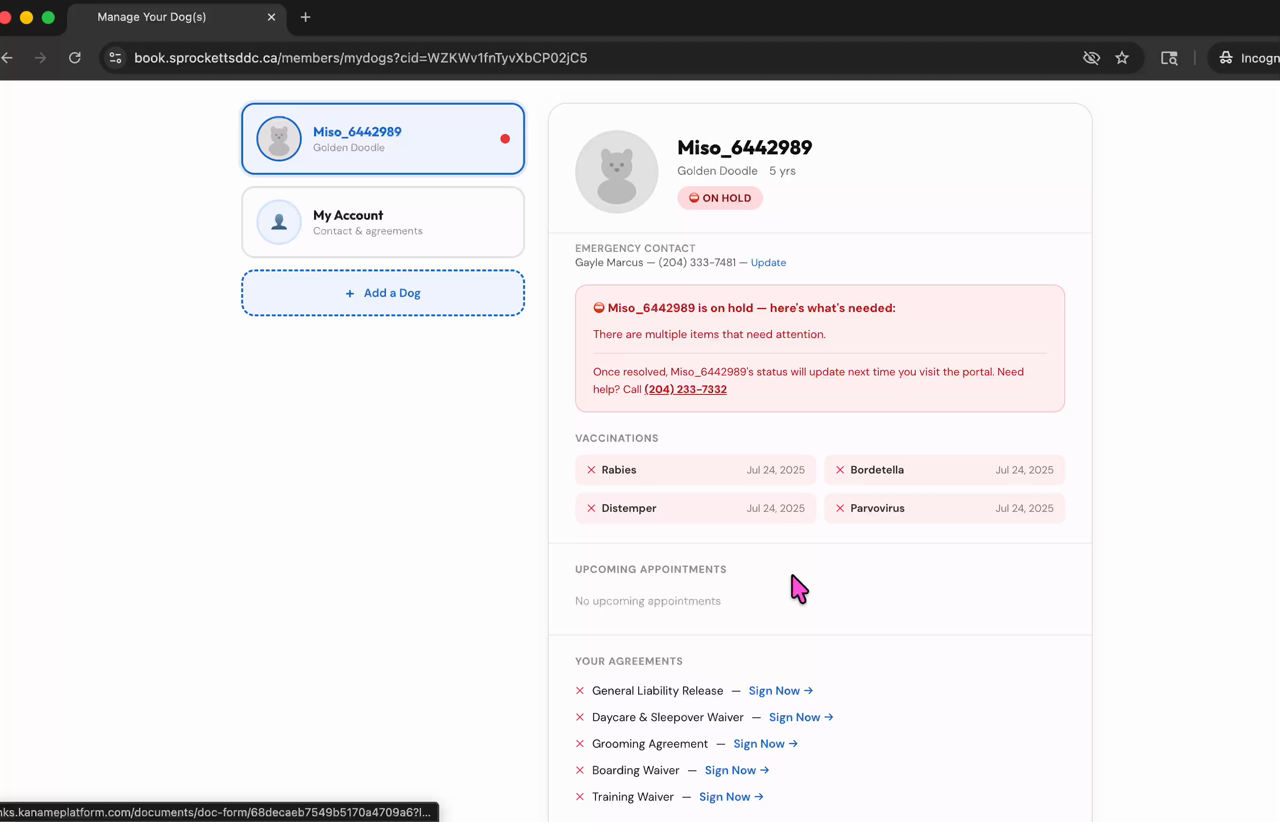
My Dogs portal showing HOLD status from expired vax
Step 1 · Their portal opens

Every dog at a glance — with their Safety Pass

HOLD = something's blocking booking. Right here it's expired vax. Could also be unsigned waivers or a missing temperament test. Booking is gated until it clears.

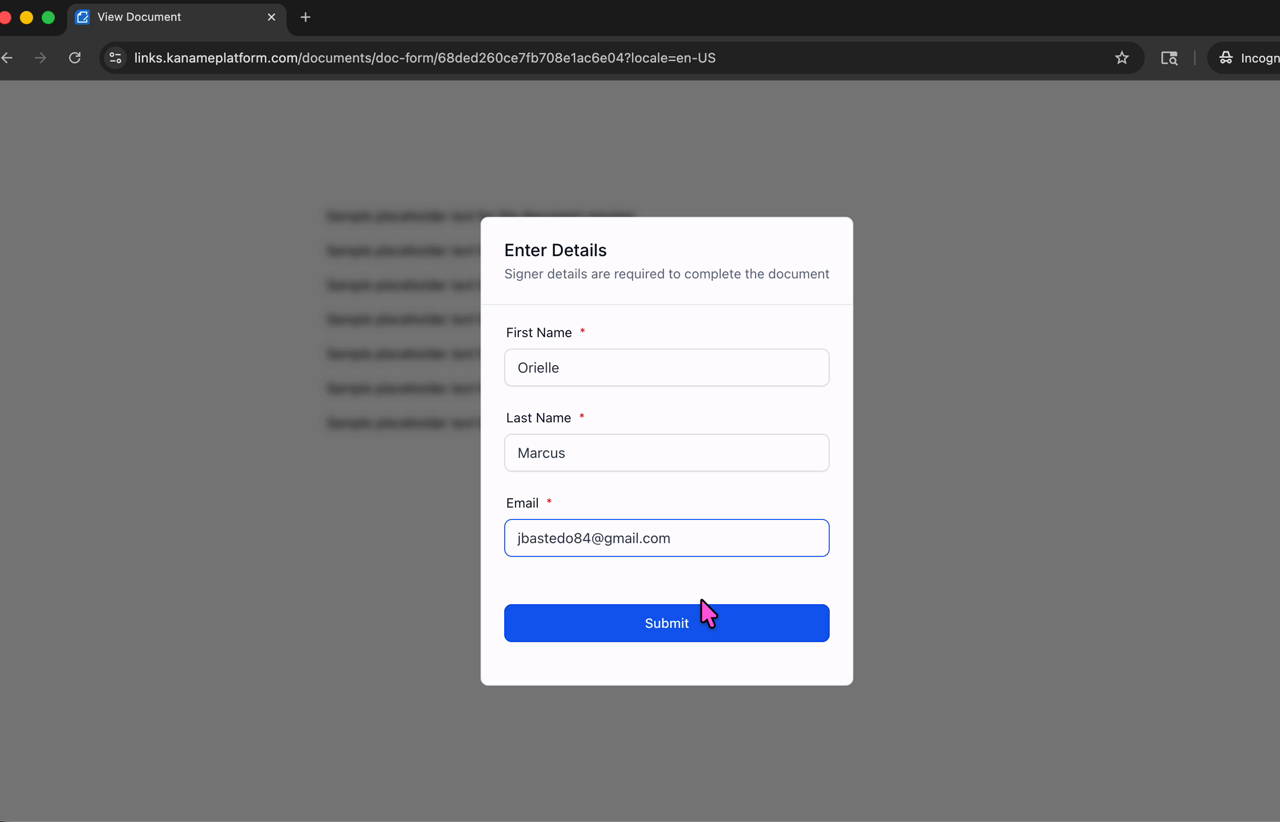
Customer signing a waiver in the portal
Step 2 · Resolve in place

They fix what's missing right in the portal

Tap the item, sign a waiver electronically, upload vax records, confirm a profile detail. No calls to the front desk. No PDF paperwork.

My Dogs portal with PASS status after fixing
Step 3 · Status flips to Pass

Their dog is ready to go

The moment everything's in order, Safety Pass auto-updates. Daycare/boarding bookings unlock. Grooming and training were never gated — those they could book all along.

Before they can book daycare or boarding

Four checks make up the Safety Pass. The portal shows them right on each dog's card. Until everything's green, daycare and boarding are gated. Grooming and training don't need this — clients can book those any time.

Gate 1 · Health

Vaccinations

Required for every service

Required: Rabies, Distemper, Parvovirus.
Recommended: Bordetella. Titers accepted.
Records uploaded in portal, or vet emails support@sprockettsddc.ca.

Gate 2 · Paperwork

Signed waivers

Electronic signature, signed once

General Release — everyone.
Daycare Waiver — for daycamp.
Boarding Waiver — for overnights.
All signed inside the portal in under a minute. No PDFs, no scans, no paper.

Gate 3 · Behaviour

Temperament test (Meet & Greet)

Required before first daycare or boarding

A free 1-hour assessment at their preferred location. Booked from the portal once vax + waivers are in. Sets the tone for safe play groups and confirms the dog is ready. Grooming and training skip this — not needed for those services.

Gate 4 · Profile

Spay/neuter & basics

Daycare-specific + universal essentials

Spay/neuter required at 8 months for daycare.
Emergency contact + vet info on file.
Profile photo (optional but recommended).
Medical/care notes if relevant.

Phase 1 — what they'll see

When invitations fire, customers will be able to sign in, see their dog's profile, sign waivers, update info, and see their package balance. Online booking stays off until you say go — gives the front desk time to settle in with the new system. Customers continue booking exactly the way they do today.

Phase 1 · Once activated

What customers can do

From the moment they activate, every customer will be able to:

  • Sign in with their own password
  • See every dog in their household — profile, photo, history
  • Sign required waivers digitally — no more paper at drop-off
  • Update vet info, emergency contacts, care notes
  • View vaccination records and expiry dates
  • See their package balance and visit history

All of this is built and ready — awaiting Touch 3 to fire.

Opens later · Phase 2

Online booking stays off

Booking continues exactly the way it does today — phone, in-person, or front desk — until the team says go.

  • Daycamp, grooming, training, boarding bookings still go through your normal channels
  • The portal shows dogs and waivers, but no “Book” buttons are live yet
  • Customers will get a separate “booking is now live” note when we open it
  • Multi-dog booking and same-day rebooking come online with that switch

The order: front desk gets settled → you sign off → booking opens to customers.

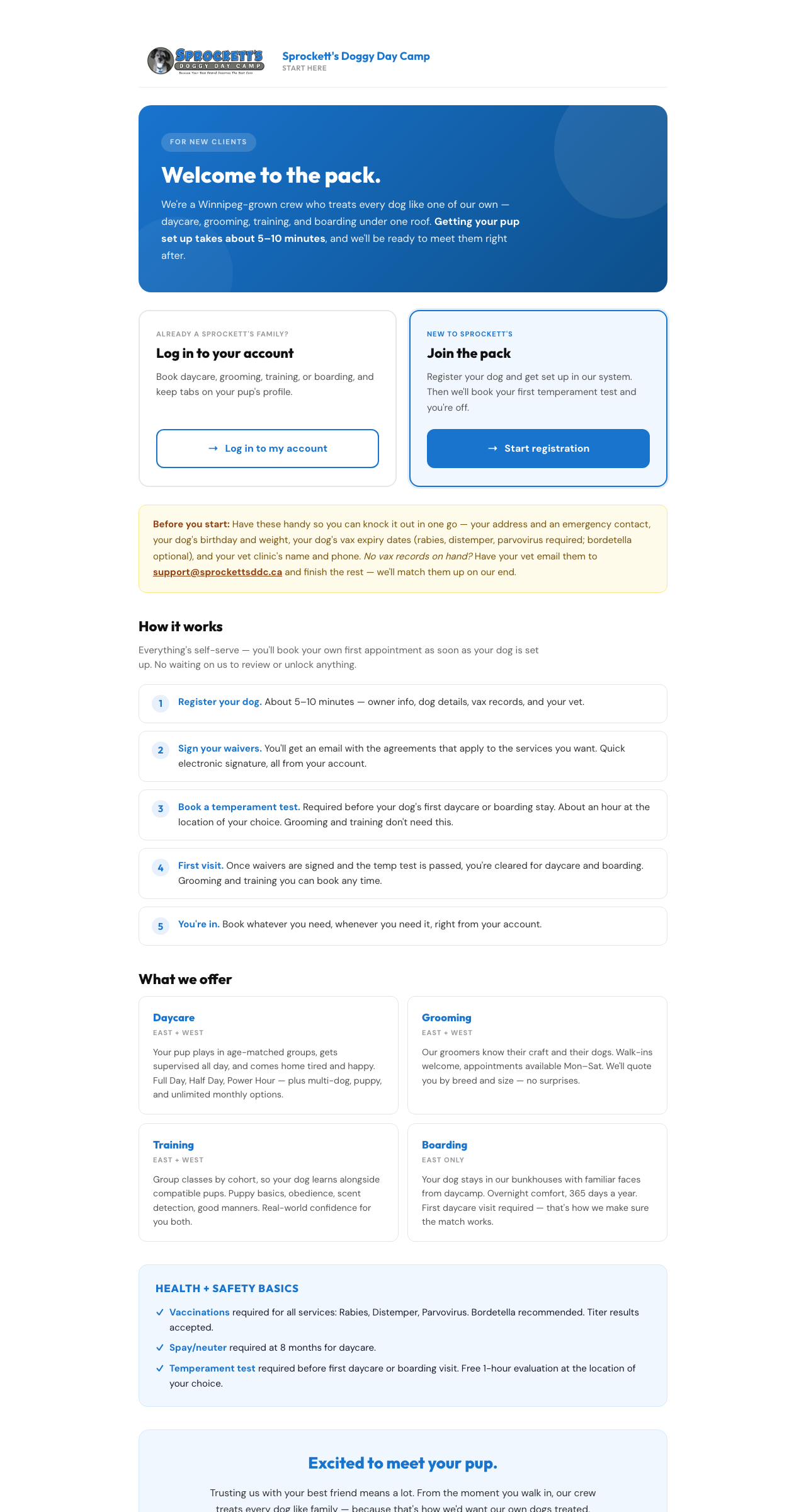
When they click "New Client"

Anyone new to Sprockett's lands here from the website's New Client CTA. Sets expectations before they hit the form — what they'll need, what comes next, and what we offer.

Two paths up top
Already a Sprockett's family? log in · New to Sprockett's? start the registration. Mirrors the existing-client page pattern.
Before you start
Pre-flight checklist: address, emergency contact, dog's birthday + weight, vax expiry dates, vet info. Cuts dropoff mid-form.
How it works
Five-step preview — register, sign waivers, book temp test, first visit, you're in. Calls out: self-serve, no waiting on staff review.
What we offer + safety
Service tiles in Sprockett's voice (Daycare, Grooming, Training, Boarding) with location notes. Health basics callout: vax, spay/neuter, temp test.

New customers sign up themselves

Anyone new lands on sprockettsddc.ca and clicks Join the Pack. The intake form captures everything Sprockett's needs. The moment they submit, they get a welcome email and access to the portal.

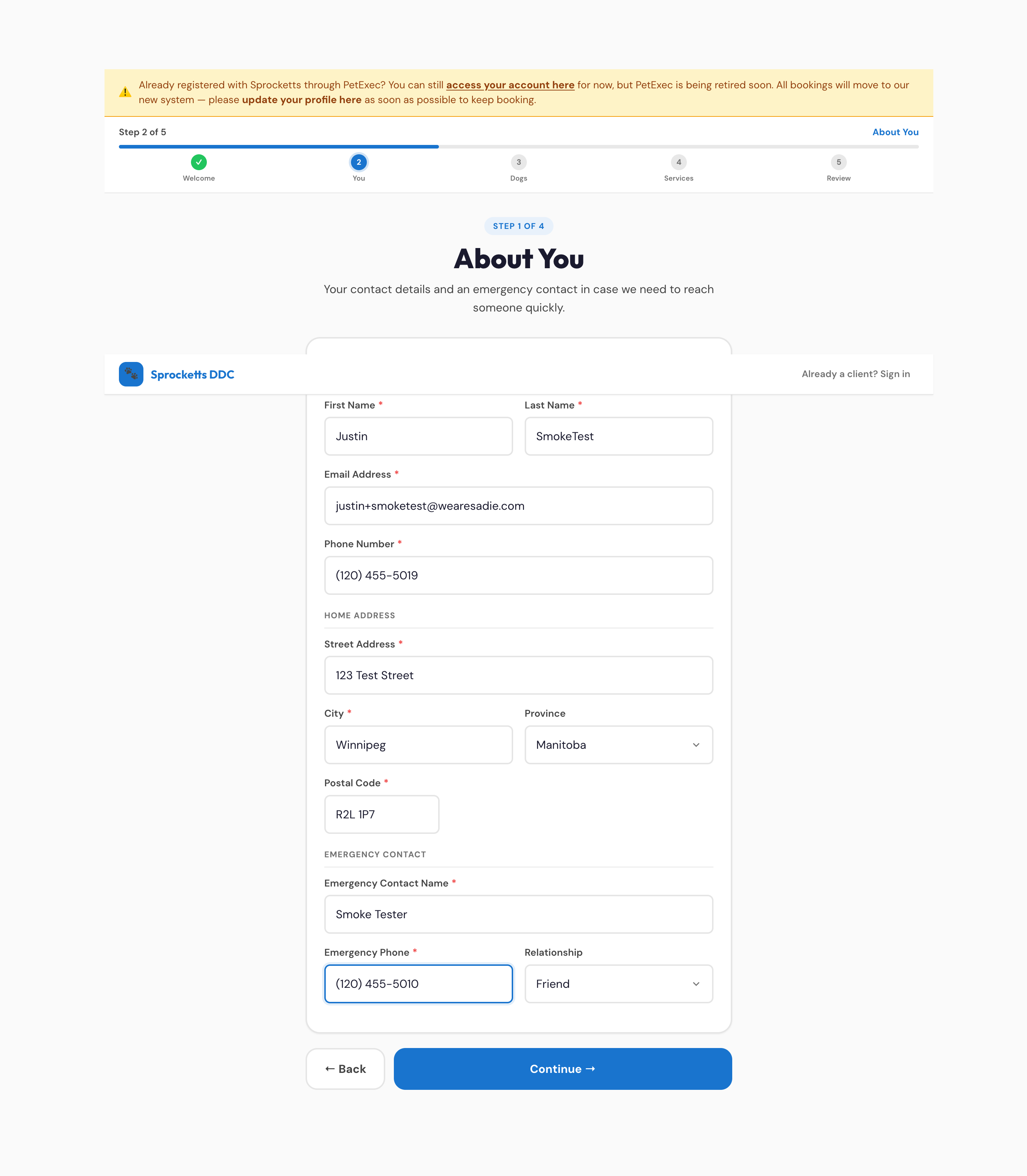
About-you intake step
Step 1 · About them

Their contact info

Name, email, phone, address, emergency contact — saved straight to their customer record.

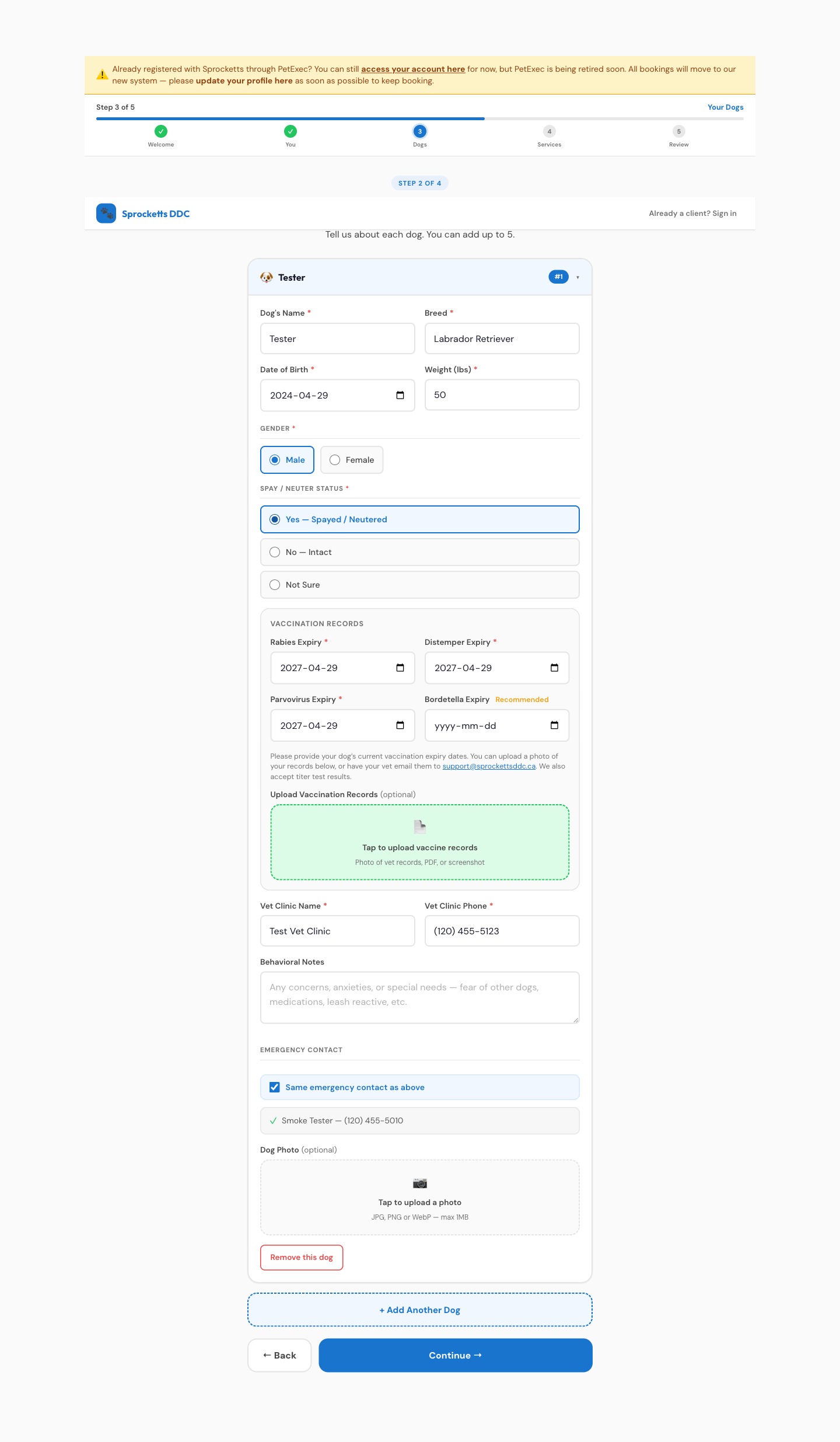
Dogs intake step
Step 2 · Their dogs

One profile per dog

Name, breed, weight, birthday, vaccinations, vet info. Multi-dog families add as many as they need.

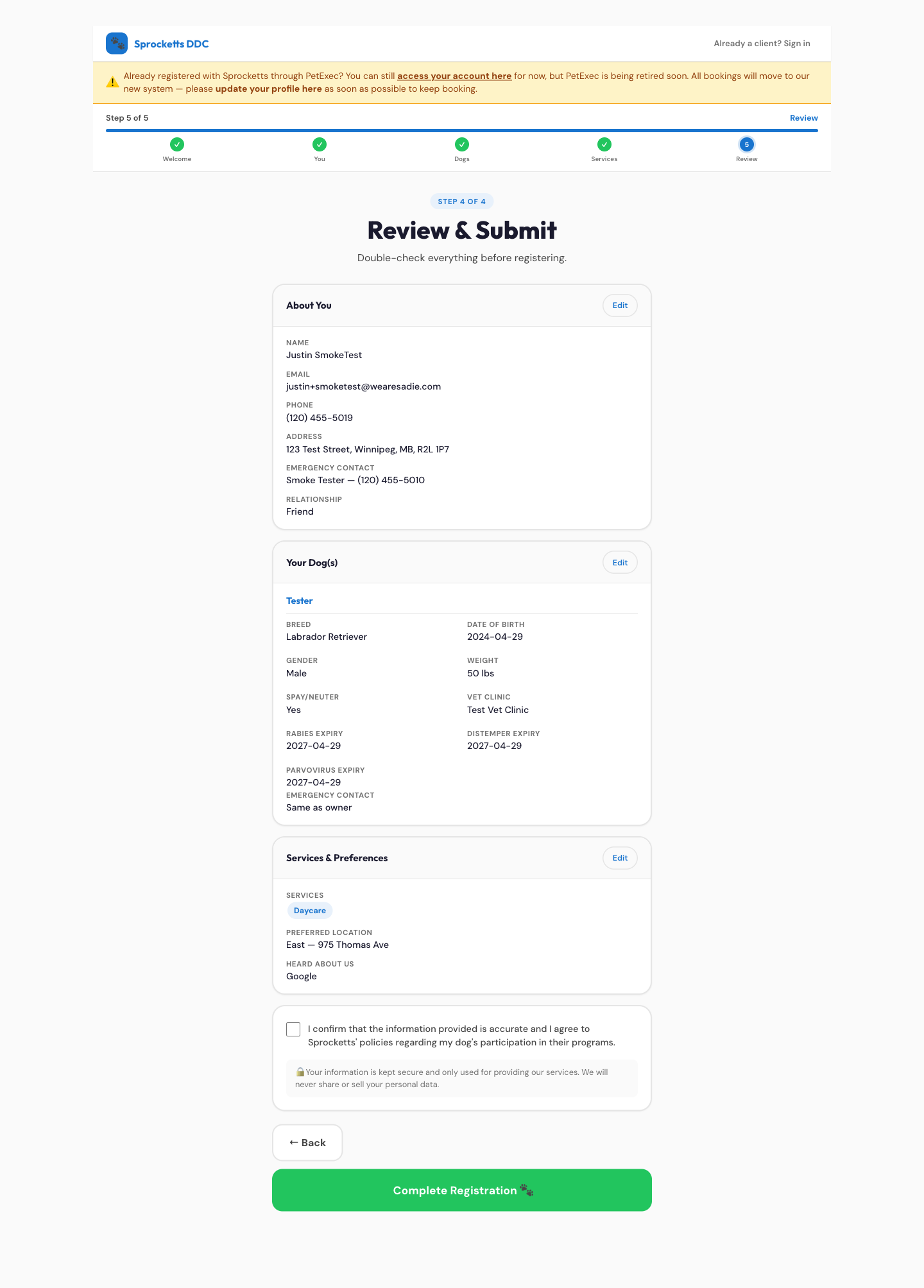
Review and submit
Step 3 · Review and submit

Final check, then in

One screen to confirm everything. Submit creates their account and triggers the welcome email.

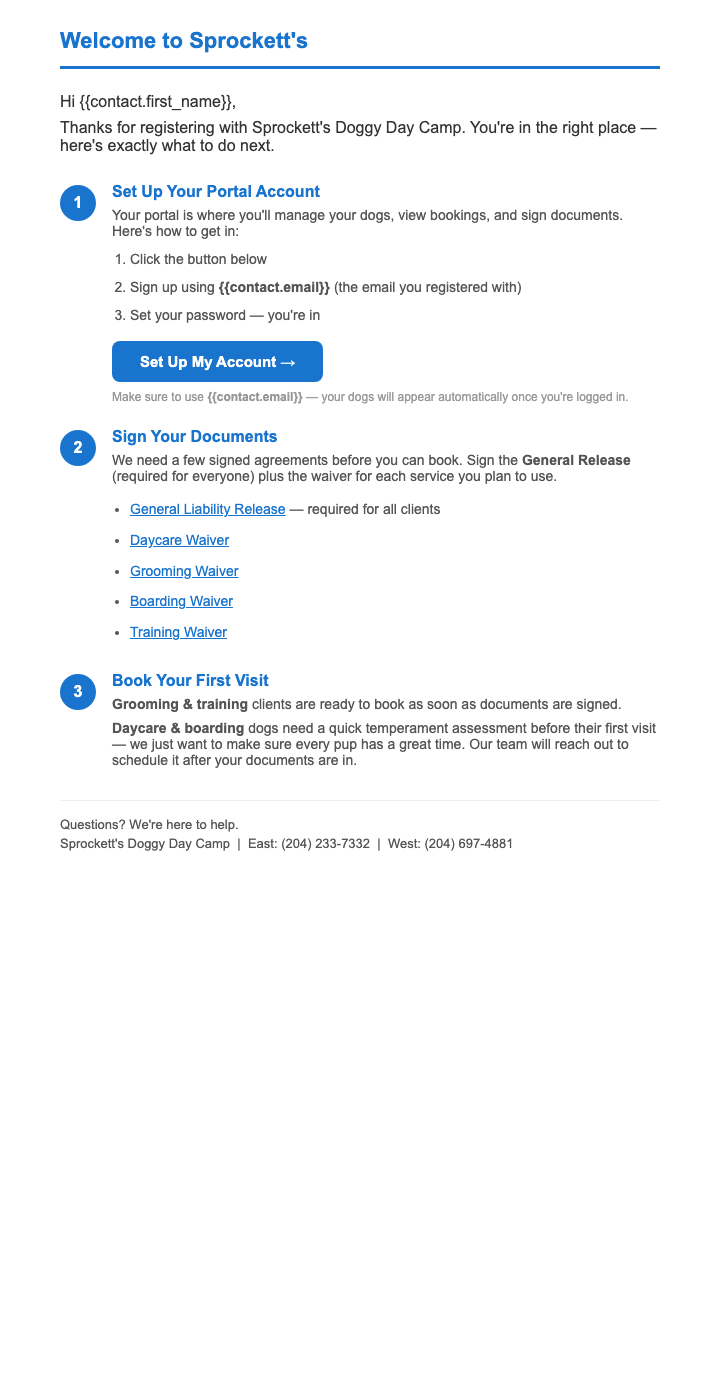
Welcome emailAuto-fires on submit

Subject: Welcome to the pack, [First Name]! — portal link, waivers to sign. Daycare/boarding dogs route to a Meet & Greet before their first visit.

SMS + email along the way

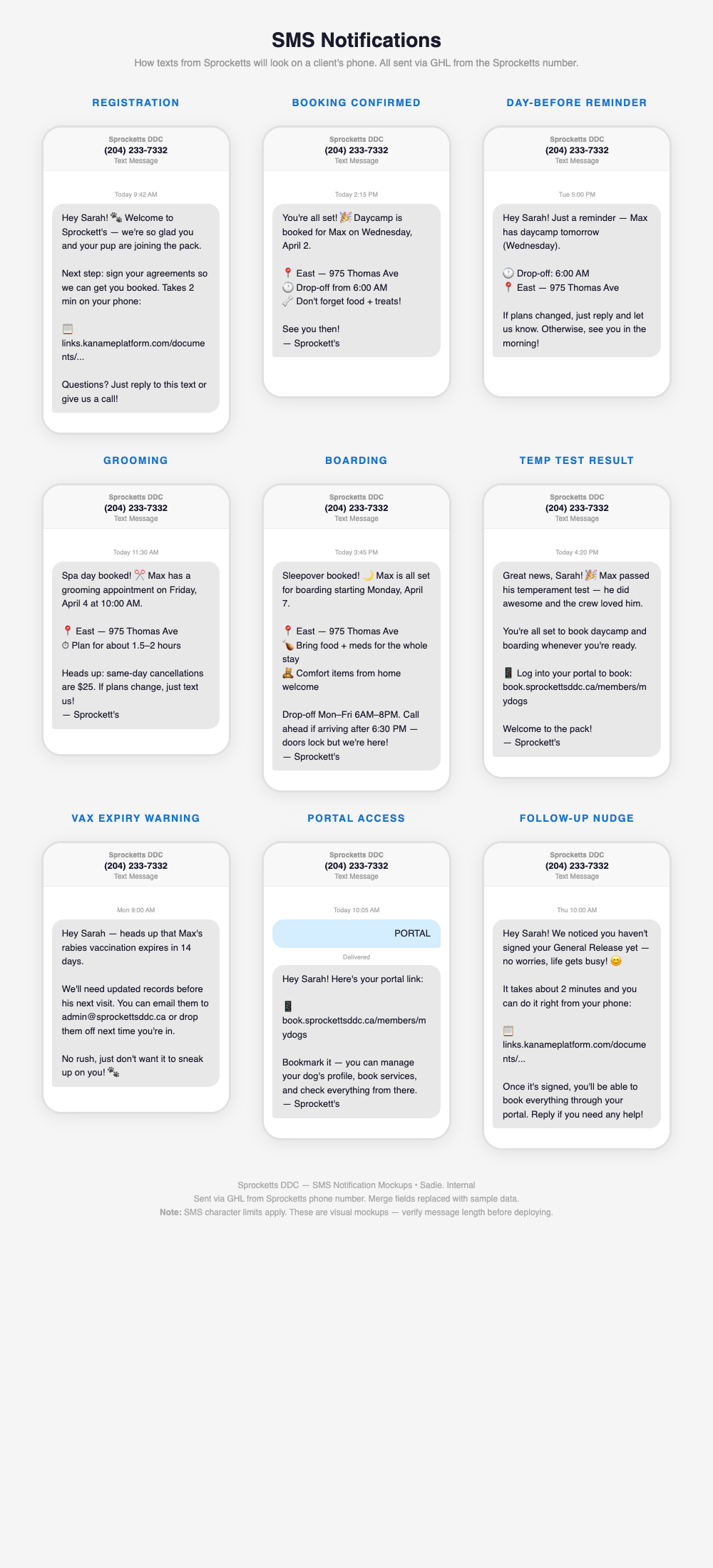
The portal isn't the only touch — SMS and email keep customers on track at the right moments, on both tracks. Same templates, same voice, fired automatically by Kanamé.

SMS templates · live in Kanamé
All Sprockett's SMS notification templates
Activation · first 4–5 days
Existing customers get the three-touch outreach — heads-up email, SMS catch-up, then the activation invite. New customers get the welcome email the moment they submit Join the Pack.
Booking lifecycle
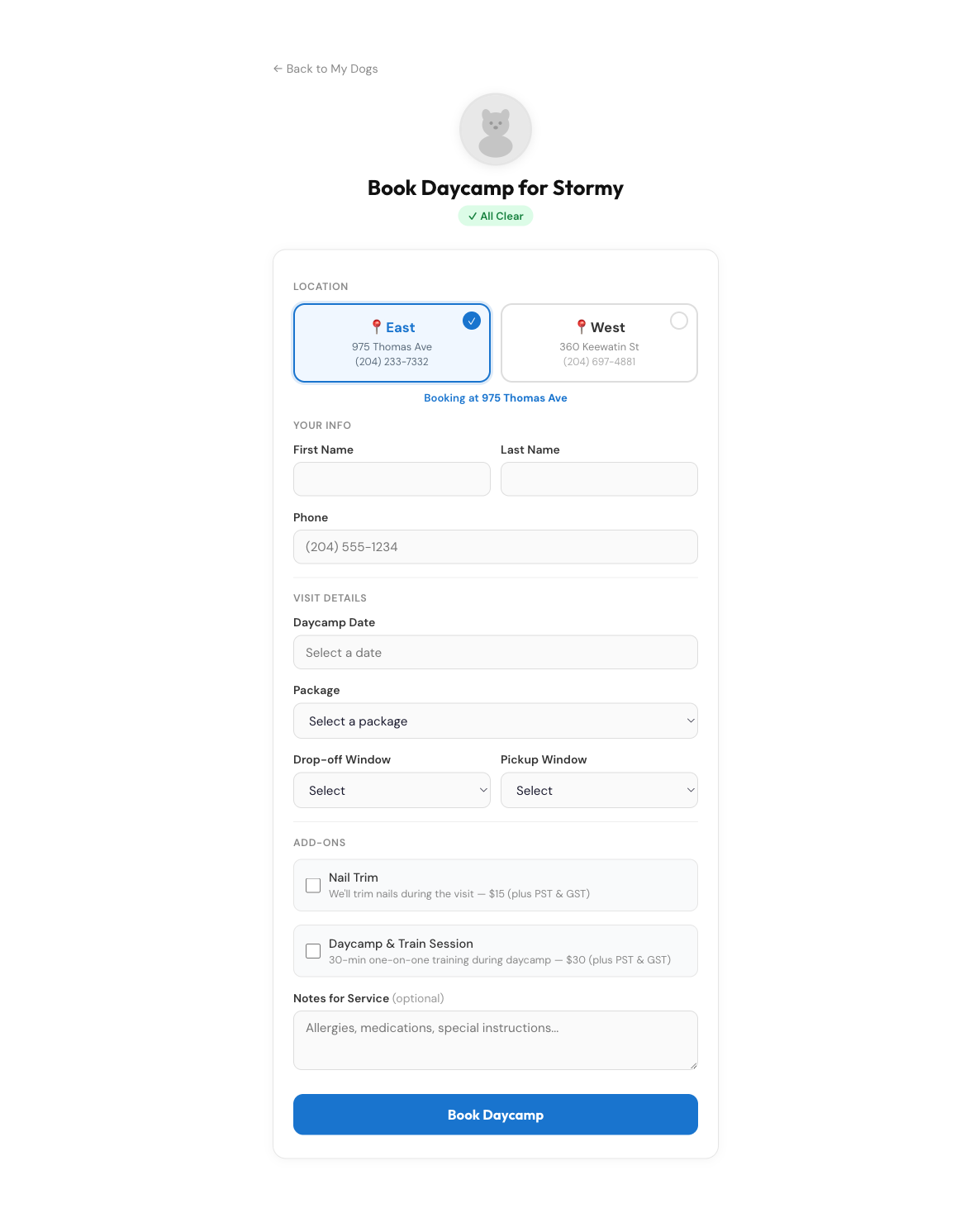
Booking confirmation, 24-hour reminder, check-in / check-out. Same templates fire whether the booking came from the portal, a personal groomer link, or front-desk.
Gating & safety
Vax expiring nudges, unsigned-waiver follow-ups, temperament-test scheduling reminders. Keeps the portal Safety Pass from going stale.
Email notifications
Activation invite + portal access, welcome email, document signing confirmations, booking confirmations, vax-expiring alerts. All from admin@sprockettsddc.ca.

Where we are right now

The platform is built and the customer-facing copy is drafted. Three things stand between today and Wave 1 firing.

Done

What's already in place

  • 4,588 customers + 5,959 dogs migrated to the new platform
  • Customer portal live — My Dogs, waivers, vaccinations, packages
  • Join the Pack intake live at book.sprockettsddc.ca/jointhepack
  • Email and SMS drafts ready for review (separate Doc shared with you)
  • End-to-end customer activation tested on a real account
Needs you

Your green-light

  • Review the email + SMS drafts — subject lines, body copy, tone. Inline comments in the Doc work.
  • Sign off on the activation date — we don't fire until you say go.
  • Confirm reply-to email for the heads-up message (currently set to tmistelbacher@sprockettsddc.ca).
On us

Sadie still owes

  • Activate the Kanamé subscription — required before customer emails can fire.
  • Repoint the website CTAs — "Existing Client" → portal login, "New Client" → Join the Pack.
  • Schedule the sends in waves after sign-off.
Next move Read the email + SMS drafts and flag anything to change. Greenlight the copy — we kick off Wave 1.

Two tracks. Same portal. One place where every Sprockett's customer manages their dog — built for you, by Sadie.